herk-video-edit: a free, local AI video editor
Drop in one raw talking-head take. The kit cuts the dead air, writes captions on your machine, burns them in as one line, and exports an h264 mp4 with .srt and word-timing files. No paid APIs, and your speech never leaves the machine.
Before / after
The left side is the raw clip. The right side is the kit's export.
| Run | Raw | Export | Dead air cut | Cuts | Captions |
|---|---|---|---|---|---|
| Public sample (shown above, 60 s slice of a public Trevor Crane YouTube video) | 60.0 s | 57.7 s | 0 s (no pauses ≥0.8 s); 2.3 s trimmed to the last full sentence | 0 | 37 cues |
| Real raw webcam take (private call, not shown; not publicly verifiable) | 60.0 s | 45.5 s | 14.3 s | 7 spans | 29 cues, 153 words |
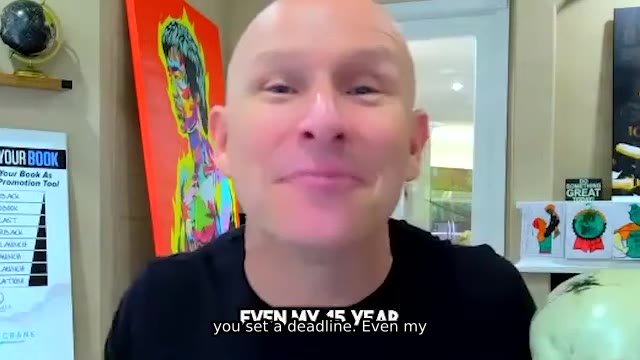
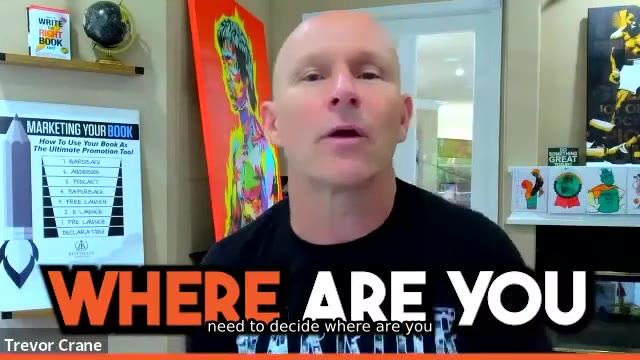
The public sample already had captions burned in, so the frames show two caption layers. The kit's caption is the white one-line text at the bottom. This public sample had no pauses long enough to cut, so it shows captions and the sentence trim only. The dead-air cut figures come from a private recording and are not publicly verifiable. The cut demo below shows a cut you can check yourself.
QC frames from the export (5 s, 25 s, 45 s):

How to use it
- Run Prompt 1 once to install the tools.
- Optional: run Prompt 2 on 3–5 reference videos you're allowed to study to get a style card.
- Download both scripts into the editor project folder (the one holding
raw-footage/), then runchmod +x ai-editor-edit.sh. Keep the two files together: the edit script callswhisper-srt.pyfrom its own folder. - Put a raw file in
raw-footage/and run Prompt 3, or run./ai-editor-edit.sh raw-footage/<file>directly. - Collect
exports/<name>.mp4,.srt,.words.json, andcuts.txt.
Download the scripts
Download ai-editor-edit.sh Download whisper-srt.py
Or from a terminal, in the editor project folder:
curl -fLO <https://epic.media/tools/herk-video-edit/scripts/ai-editor-edit.sh>
curl -fLO <https://epic.media/tools/herk-video-edit/scripts/whisper-srt.py>
chmod +x ai-editor-edit.sh
SHA-256 checksums:
ai-editor-edit.sh:60254bdfe3b644018ab6f7192dc9fc0b3f5a8c9c4a01a7c3a633dd3e3d513bafwhisper-srt.py:bd6d8f2d24773acbf31f8e5e55506561b70f3b1b803b882c787b7f733ffee4ad
Cut demo you can check
A 24.5 s clip made from the same public video, with 2.5 s of silence added at 10 s (a frozen frame, no sound) so there is dead air to cut. The script removed 2.2 s and the export is 22.3 s. It left 0.15 s of the pause on each side.
Before (24.5 s)
After (22.3 s)
Its cuts.txt (source start and end, in seconds):
10.149250 12.350208
Mac setup
With Homebrew, install FFmpeg from the homebrew-ffmpeg tap, because the plain brew install ffmpeg build has no libass, so it cannot burn captions. If you already have the plain one, run brew uninstall ffmpeg first.
brew tap homebrew-ffmpeg/ffmpeg
brew install homebrew-ffmpeg/ffmpeg/ffmpeg yt-dlp
ffmpeg -hide_banner -filters | grep subtitles
The last line must print a subtitles row. If it prints nothing, captions will fail, so fix FFmpeg before you go on. Then run python3 -m pip install -U faster-whisper "av<19". The av<19 pin is there because av 19 breaks faster-whisper 1.2.1 (it fails with open() got an unexpected keyword argument 'metadata_errors'). Add Node.js 22+ (brew install node) only if you use Remotion or Hyperframes. The scripts run on the bash that ships with macOS. On a Mac they skip the Linux free-memory check and the shared lock.
Folders
Create these three folders in the editor project, the working directory for one video:
| Folder | What goes in it |
|---|---|
raw-footage/ |
The uncut recording. One file per edit. |
references/ |
3 to 5 videos you are allowed to study, plus style.md. |
exports/ |
The finished h264 mp4, plus <name>.srt and <name>.words.json. |
Five free tools
-
FFmpeg (dead air, burn-in, h264 export). Download: https://ffmpeg.org/download.html. Debian/Ubuntu:
sudo apt-get update && sudo apt-get install -y ffmpeg. The build needs libass so thesubtitlesfilter exists. Check:ffmpeg -hide_banner -filters | awk '$2=="silencedetect" || $2=="subtitles"'. Docs: https://ffmpeg.org/ffmpeg-filters.html#silencedetect and https://ffmpeg.org/ffmpeg-filters.html#subtitles. The filter's own defaults are noise-60dBand duration2seconds. Room tone in a talking-head take sits above-60dB, so the edit script usesnoise=-30dBandduration=0.8(override withSILENCE_NOISEandSILENCE_DURATION). It also leaves0.15seconds of the detected silence on each side of a cut (SILENCE_PAD) so a word edge stays in the file. That pad is a script choice. The filter docs are silent on one. Each span the script removes is logged incuts.txtas source start and end. A jump that was already in the footage is absent from that file. -
faster-whisper (local captions). Install:
python3 -m pip install -U faster-whisper. Docs: https://github.com/SYSTRAN/faster-whisper. The caption script loads one fixed model,small.enorbase.en, withdevice="cpu",compute_type="int8",cpu_threads=1, andnum_workers=1, after settingOMP_NUM_THREADS=1andMKL_NUM_THREADS=1. Decode islanguage="en",temperature=0(one value),beam_size=5,best_of=1,condition_on_previous_text=False, andvad_filter=False, with word timestamps. The final mp4 encode uses-threads 1and bitexact flags so the same inputs write the same bytes. It writes an SRT and a words sidecar. Every word is kept, in order, in one cue. A cue closes at 6 words (at least 4 when that still fits), 2.5 seconds, or about 32 characters, whichever comes first, and the line has no break. The burn is one line: Fontsize 14, MarginV 20, WrapStyle 2. The edit script saves both files asexports/<name>.srtandexports/<name>.words.json. The first run downloads the model. Speech stays on this machine. -
yt-dlp (bring in a reference you are allowed to save). Install:
python3 -m pip install -U "yt-dlp[default]". Docs: https://github.com/yt-dlp/yt-dlp/wiki/installation. Save intoreferences/. Skip any URL you do not have the right to store. -
Remotion (React compositions when the edit needs motion graphics). Needs Node.js. Docs: https://www.remotion.dev/docs/ and https://www.remotion.dev/docs/cli/create-video. Scaffold in its own folder, outside any git repo:
npx create-video@latest. The--yesscaffold fails inside an existing git repo, so run it outside any existing git repo. Free License covers an individual, a team of up to 3, and a non-profit. A larger company needs a Company License: https://www.remotion.dev/docs/license. Buying a license needs an OK first. -
Hyperframes (HTML compositions, local mp4). Needs Node.js 22 or newer, and FFmpeg. CLI:
npx hyperframes. Docs: https://github.com/heygen-com/hyperframes and https://hyperframes.heygen.com/faq. Local render is free and needs no HeyGen account. HeyGen voices, avatars, and cloud render are a separate account. Leave those off unless someone approves that spend.
Prompt 1. Install
Set up the local AI video editor.

1. In the editor project, create three folders: raw-footage/, references/, and exports/.
2. Install FFmpeg with libass. Debian/Ubuntu: sudo apt-get update && sudo apt-get install -y ffmpeg. Otherwise use <https://ffmpeg.org/download.html>. Confirm silencedetect and subtitles are present: ffmpeg -hide_banner -filters | awk '$2=="silencedetect" || $2=="subtitles"'. Docs: <https://ffmpeg.org/ffmpeg-filters.html#silencedetect> and <https://ffmpeg.org/ffmpeg-filters.html#subtitles>.
3. Install faster-whisper: python3 -m pip install -U faster-whisper. Docs: <https://github.com/SYSTRAN/faster-whisper>. Models for this kit: small.en and base.en, CPU, int8. The first caption run downloads the model.
4. Install yt-dlp: python3 -m pip install -U "yt-dlp[default]". Docs: <https://github.com/yt-dlp/yt-dlp/wiki/installation>.
5. Install Node.js 22 or newer. Remotion: read <https://www.remotion.dev/docs/> and scaffold with npx create-video@latest in its own folder, outside any git repo (--yes fails inside a git repo: <https://www.remotion.dev/docs/cli/create-video>). Free License covers an individual, a team of up to 3, and a non-profit. A larger company needs a Company License (https://www.remotion.dev/docs/license). Do not buy one without an OK.
6. Hyperframes: npx hyperframes. Docs: <https://github.com/heygen-com/hyperframes>. Local render needs no HeyGen account (https://hyperframes.heygen.com/faq). Leave HeyGen cloud, voices, and avatars off unless that spend is approved.

Stop when the three folders exist and each tool prints a version, help, or doctor line.
Prompt 2. Style from 3 to 5 references
The line to keep in the style card is: inspired, NOT copied.
Build a style card from 3 to 5 reference videos. The result is inspired, NOT copied.

1. Put 3 to 5 reference videos in references/. Use files already on disk, or yt-dlp for a URL you have the right to save: yt-dlp -o "references/%(title)s.%(ext)s" "<url>". Skip any URL you are not allowed to store.
2. Watch each one. Note the open, how long a shot holds, where cuts land, caption size, caption placement, and the pace of the first 10 seconds.
3. Write references/style.md. Short card the next edit can follow: pace, cut rhythm, caption look, how it opens. Patterns and ranges. No copied lines, frames, music, graphics, or layout.
4. End references/style.md with this exact line: inspired, NOT copied.

Study the references. The raw file stays the footage. The card describes patterns.
Prompt 3. Edit a raw file
Edit one raw file: cut dead air, captions, export.

1. Put the raw file in raw-footage/. Read references/style.md if it exists and follow its pace and caption notes. The footage stays this recording.
2. In the editor project root, download both scripts into the same folder and make the edit script runnable:
   curl -fLO <https://epic.media/tools/herk-video-edit/scripts/ai-editor-edit.sh>
   curl -fLO <https://epic.media/tools/herk-video-edit/scripts/whisper-srt.py>
   chmod +x ai-editor-edit.sh
   Then run:
   ./ai-editor-edit.sh raw-footage/<file>
3. The script cuts dead air with ffmpeg silencedetect, writes cuts.txt, runs whisper-srt.py (from the same folder) to write the captions, burns the SRT as one line, and writes exports/<name>.mp4, exports/<name>.srt, and exports/<name>.words.json. It prints the mp4 path. The export and the SRT end on the last word that ends in . ? or !. Pass --no-end-on-sentence to keep a trailing fragment.
4. Play the export. Words are intact at each cut, captions match the speech and stay one line, the file is h264 in exports/, cuts.txt lists only the jumps this script made, and the picture follows references/style.md. The card's last line still reads: inspired, NOT copied.

Defaults, if a take needs a change: SILENCE_NOISE=-30dB, SILENCE_DURATION=0.8, SILENCE_PAD=0.15, WHISPER_MODEL=small.en (set WHISPER_MODEL=base.en for the smaller model). Docs: <https://ffmpeg.org/ffmpeg-filters.html#silencedetect> and <https://github.com/SYSTRAN/faster-whisper>.
Build herk-20261104-003051